
Vehicle Motion Cues: what it is and whether it works
Vehicle Motion Cues is Apple's built-in motion sickness feature, added in iOS 18: animated dots at the edges of the iPhone screen that move with the car's real motion, so your eyes and inner ear stop disagreeing while you read. Turn it on under Settings > Accessibility > Motion. On Android, Google's Motion Assist is widely rolled out on Android 17 Pixels and reaching Galaxy phones with One UI 9, and recent OnePlus, OPPO, vivo and Honor phones have their own version. Mac laptops on macOS Tahoe 26 or later have it too, with some model exceptions.
Prone to motion sickness? No dots on your phone, or still queasy with them on? Dizzout is a drug-free sound app, free to download, that works on any phone, eyes open or closed.Starts in your browser · works with any headphones
Get your personalized Dizzout plan. Paid subscription for full access.

On your phone? Scan to start there.
Does your phone have it?
Checking your device…
Why dots on a screen help
Reading in a moving car is the textbook trigger for motion sickness: your eyes lock onto a page that isn't moving while your inner ear reports every brake and corner. That disagreement between the two senses is what makes you feel sick. Vehicle Motion Cues resolves part of it by adding a motion signal into the screen: the dots drift opposite to the car's acceleration, so your visual system finally sees something that agrees with what your body feels.
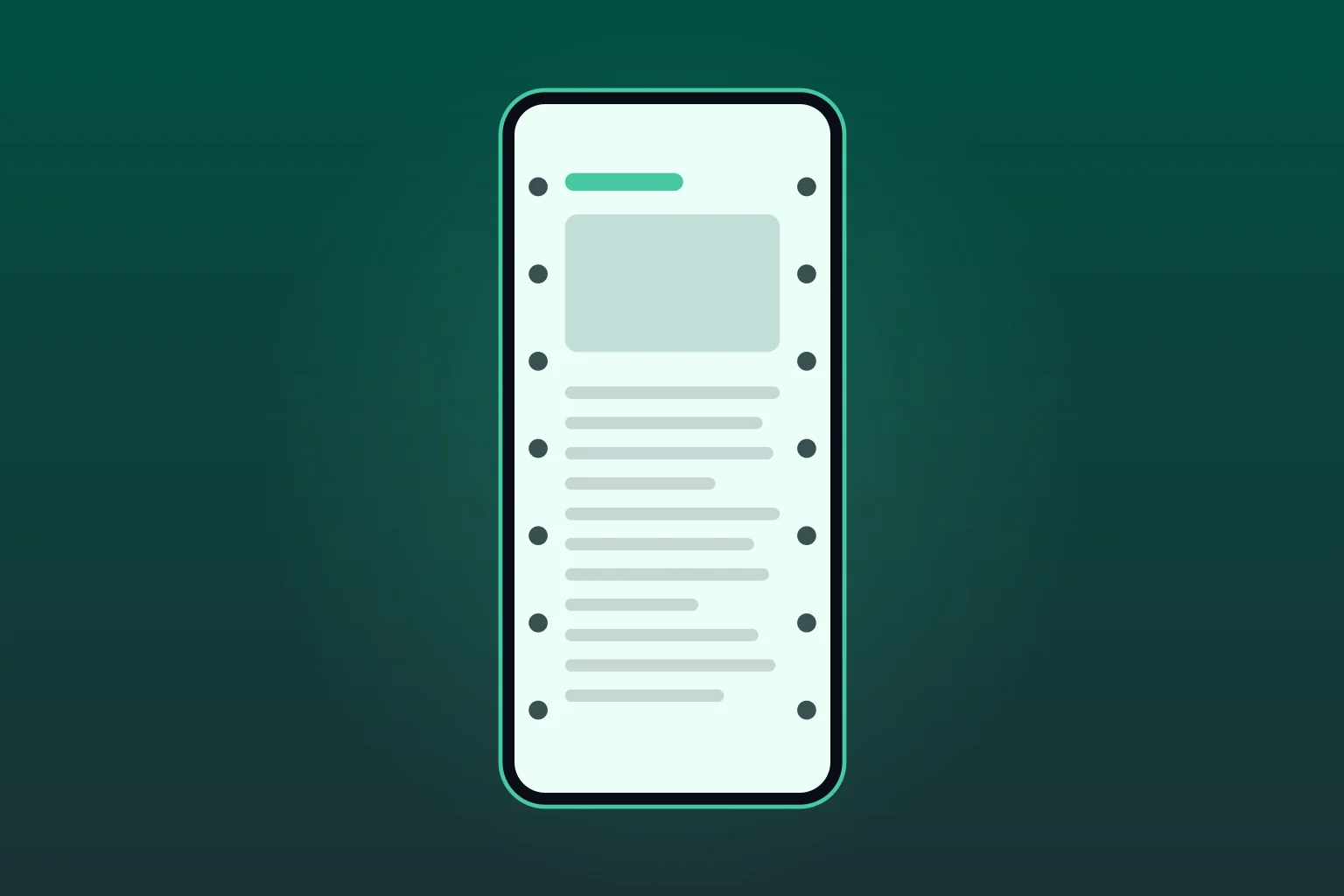
It's the same principle behind the oldest advice in travel: look at the horizon. The horizon gives your eyes a true motion reference; the dots are a miniature version of one you can carry while reading.
How to turn it on (iPhone, iOS 18 and later)
- Open Settings and tap Accessibility.
- Tap Motion.
- Tap Vehicle Motion Cues.
- Choose Automatic, so the dots appear only when the iPhone detects you're riding in a vehicle, and disappear when the motion stops.
You can also add it to Control Center for a one-tap toggle before a journey. The feature requires iOS 18 or later, so on earlier iOS versions the menu item is simply not there.
If the setting is not where this says it is, or the dots never appear once it is on, the iPhone motion sickness setting page goes deeper: the Control Center toggle step by step, which iPhones and iPads qualify, and the reasons the dots stay hidden. And when the failure is not iPhone-shaped, the dots not working guide matches every platform's failure states to their causes in one place.
On a MacBook: Vehicle Motion Cues for Mac laptops
Apple brought Vehicle Motion Cues to Mac laptops with macOS Tahoe 26. Apple describes it as onscreen dots for when you use a Mac as a passenger in a car or other on-road vehicle.
- Choose Apple menu > System Settings.
- Click Accessibility in the sidebar, then Motion.
- Turn on Vehicle Motion Cues.
Which MacBooks have it: Apple lists the option for Mac laptops only, and says it is not available on MacBook Neo, MacBook Air (M1), or the 13-inch MacBook Pro (M1) or earlier. If the switch is missing, check your model and that the Mac runs macOS Tahoe 26 or later.
In the same place you can change the look: a Regular or Dynamic pattern, the dot color, and switches for Large dots and More dots. Apple says the cues work best when you sit facing forward, and that they are not for use while operating a vehicle.
On a Windows laptop
We found no built-in vehicle motion setting in Windows 11 when we checked in October 2026. The nearest switch is Start > Settings > Accessibility > Visual effects > Animation effects, which Microsoft describes as the way to stop Windows showing animations. That calms motion on the screen but adds no moving dots. Third-party apps borrow a phone's motion sensors instead: Carsick.App, for example, offers a Windows download (Windows 10 or later) that pairs with its phone app. Our Carsick.App guide covers how it compares.
The Android situation, phone by phone
| Phone | Built-in feature | Where |
|---|---|---|
| iPhone (iOS 18+) | Vehicle Motion Cues | Settings > Accessibility > Motion |
| Google Pixel (Android 17) | Motion Assist, widely rolled out since mid September 2026 | Settings > your Google account profile > All services > Personal & device safety |
| Samsung Galaxy | Google's Motion Assist, rolling out with One UI 9 since mid September 2026 | Search Settings for motion assist, or Settings > Google > All services > Personal & device safety |
| OnePlus | Motion cues (OxygenOS 16) | Settings > Accessibility & convenience > Motion cues |
| OPPO | Motion Cues (ColorOS 16) | Search Settings for motion |
| vivo | Motion prompts (OriginOS 6) | Search Settings for motion |
| Honor | Motion Sickness Relief (MagicOS 9 and later) | Settings > Accessibility features > Motion Sickness Relief |
| Xiaomi | Motion Sickness Reduction (HyperOS 3.1): calms scrolling, no vehicle dots | Search Settings for motion |
| Motorola | Google Motion Assist once the phone runs Android 17 (no Motorola setting of its own) | Search Settings for motion assist |
| Other Android | Motion Assist once the phone runs Android 17 | A third-party app until then |
The device-specific walk-throughs live on their own pages: Samsung Galaxy options, Pixel options, and the full Android answer. If you've heard people talk about “the motion sickness dots”, that's this same feature by its street name.
Does it actually work, and where it stops helping
The mechanism is well-grounded: reducing visual-vestibular conflict is the same principle behind every evidence-backed visual fix for motion sickness. Apple built the feature on it, and user reports are largely positive. What doesn't exist yet is an independent published trial of the feature itself, so the honest framing is “free, built in, mechanistically sensible, worth turning on” rather than “proven.”
Its two hard limits: the dots only help while you're looking at the screen, and they are prevention, not rescue: once nausea has already set in, visual cues rarely pull you back. At that point the moves that help are putting the phone down, getting cool air and a forward view, and slow breathing.
If you would rather use an app at that point, compare the motion sickness apps for iPhone, including the sound-based ones you use with headphones.
Prepare audio as its own step
Once you have finished checking phone settings, prepare Dizzout with your ordinary headphones. Keep the screen put away during the rest of your preparation.
Free to download. Paid subscription for full access.
30,000+ travelers in 30+ countries · How we count

On your phone? Scan to start there.
Comparing apps first? See how the motion sickness apps compare

Frequently asked questions
What is Vehicle Motion Cues?+
Vehicle Motion Cues is an iPhone accessibility feature Apple added in iOS 18. When you're riding in a car, it shows small animated dots along the edges of the screen that move with the vehicle's actual motion: braking, accelerating, turning. That gives your eyes a motion signal that matches what your inner ear feels, which reduces the sensory conflict that causes motion sickness while reading or scrolling in a moving vehicle.
How do I turn on Vehicle Motion Cues on iPhone?+
Open Settings > Accessibility > Motion > Vehicle Motion Cues and choose Automatic (the dots appear only when your iPhone detects you're in a moving vehicle) or On. You can also add it to Control Center for one-tap access. It requires iOS 18 or later.
Does Android have Vehicle Motion Cues?+
Not under that name, but the same idea is spreading. Google's version, Motion Assist, is widely rolled out on Android 17 Pixels and has been reaching Galaxy phones with One UI 9 since mid September 2026. Recent OnePlus, OPPO, vivo and Honor phones ship their own version under their own names. On a phone without any of that, a third-party app such as KineStop overlays similar moving cues, or a sound-based app works without needing you to look at the screen.
Does Samsung have Vehicle Motion Cues?+
Not under that name, and not as a Samsung feature. Galaxy phones get Google's equivalent, Motion Assist, with One UI 9 on Android 17: it started rolling out in mid September 2026, first wave including the S26 FE, Z Flip 8, Z Fold 8 and Z Fold 8 Ultra. It sits under the Google section of Settings, not in Vision enhancements. Samsung's own motion sickness product is Hearapy, a free app that uses sound rather than dots.
Does Vehicle Motion Cues work on a Mac?+
Yes, on Mac laptops running macOS Tahoe 26 or later. Open System Settings > Accessibility > Motion and turn on Vehicle Motion Cues. Apple's Mac guide says it is not available on MacBook Neo, the M1 MacBook Air, the 13-inch M1 MacBook Pro or earlier models. As on iPhone, the dots only help while you are looking at the screen, and they work best seated facing forward.
Is there Vehicle Motion Cues for Windows?+
Not as a built-in Windows feature that we could find in October 2026. Windows 11's Animation effects switch, under Settings > Accessibility > Visual effects, turns off interface animations but adds no moving dots. Third-party apps such as Carsick.App pair a phone with a Windows laptop and show motion cues on the laptop screen.
Do Vehicle Motion Cues actually work?+
The mechanism is sound: motion sickness while reading in a car comes from your eyes reporting a stationary page while your inner ear reports movement, and giving the eyes a matching motion signal reduces that conflict. Apple built the feature on that principle, and many users report it helps. Independent published trials of the feature itself haven't appeared yet, so honest advice is: it's free, built in, and worth turning on. If you're still queasy with it on, the dots only help while you're looking at the screen.
What are the limitations of Vehicle Motion Cues?+
Two main ones. First, it only helps while your eyes are on the screen, and it does nothing once you put the phone down, close your eyes, or look out the window. Second, it's prevention rather than rescue: it reduces the conflict that builds nausea, but once you already feel sick, dots on a screen rarely bring you back. For that situation, put the phone away, get a forward view or fresh air, and consider a sound-based option that works with your eyes closed.
Related guides
- Motion sickness dots: how to get them on any phone
- The dots in your browser, for phones without them
- iPhone motion sickness setting: how to turn it on
- Vehicle Motion Cues on Android: who has it
- Samsung motion sickness dots: what Galaxy has today
- Every phone's motion sickness setting, compared
- Check your phone model: the dots answer for 44 phones
- Screen motion sickness and cybersickness
- Laptop work in a moving car: Carsick.App compared
Feature availability checked in September 2026, and the Mac and Windows sections in October 2026; settings menus and supported models can change with OS updates. Apple, iPhone, Mac, macOS, MacBook, Microsoft, Windows, Carsick.App, Vehicle Motion Cues, Samsung, Galaxy, One UI, Hearapy, Google, Pixel, Motion Assist, OnePlus, OPPO, vivo, Honor and KineStop are trademarks of their respective owners; Dizzout is not affiliated with or endorsed by them. This page is informational and not medical advice.